Modern marine electronics allow boat owners to monitor engine data directly from multifunction displays. If you want to connect a Mercury outboard to Lowrance equipment, the process is relatively straightforward when using the correct adapters, cables, and network components. A proper Mercury to Lowrance connection gives access to engine RPM, fuel flow, engine temperature, voltage, trim position, and other important SmartCraft data directly on the chartplotter.
This guide explains how to connect Mercury outboard to Lowrance displays step by step, including SmartCraft integration, NMEA 2000 networking, and troubleshooting tips.
Why Connect Mercury Outboard to Lowrance?
Many boat owners integrate Mercury engines with Lowrance displays to centralize vessel information on one screen. Instead of using separate gauges, engine information becomes available directly on the Lowrance multifunction display.
Benefits include:
- Real-time engine monitoring
- Fuel management and fuel economy tracking
- SmartCraft diagnostics
- Cleaner dashboard layout
- Easier navigation and engine control integration
- Better awareness during long offshore trips
A Mercury SmartCraft to Lowrance setup is especially useful for fishing boats, center consoles, and cruising yachts.
Understanding Mercury SmartCraft and NMEA 2000
Before starting the installation, it is important to understand the communication systems involved.
Mercury outboards use the SmartCraft protocol for engine communication. Lowrance displays operate primarily through NMEA 2000 networks.
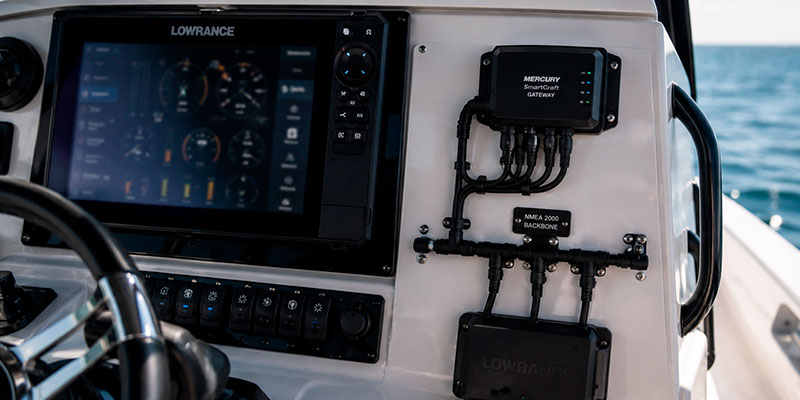
To connect Mercury engine data to Lowrance displays, you need a gateway that converts SmartCraft data into NMEA 2000 language.
The most common solution is:
- Mercury SmartCraft Gateway
- VesselView Link
- Mercury NMEA 2000 gateway adapter
Once connected, the Lowrance display can read engine information directly from the NMEA 2000 backbone.
Equipment Needed for Mercury to Lowrance Connection
To complete the installation, you typically need:
- Lowrance display with NMEA 2000 support
- Mercury outboard with SmartCraft capability
- SmartCraft gateway
- NMEA 2000 starter kit
- T-connectors
- NMEA 2000 backbone cable
- Power node
- Drop cables
- Terminators
For newer Mercury engines, VesselView Link often provides the best compatibility with Lowrance HDS Live, Elite FS, and Lowrance Carbon systems.
Older Mercury outboards may require specific SmartCraft adapters depending on engine year and ECM generation.
How to Connect Mercury Outboard to Lowrance Step by Step
Step 1: Verify SmartCraft Compatibility
Not every Mercury outboard supports SmartCraft communication. Most Mercury engines manufactured after 2004 support SmartCraft, but verification is important before purchasing components.
Check:
- Engine serial number
- SmartCraft connector presence
- Engine model year
- Existing gauge system
If the engine already uses SmartCraft gauges, integration with Lowrance is usually simple.
Step 2: Install the NMEA 2000 Network
Lowrance displays communicate through an NMEA 2000 backbone.
A standard NMEA 2000 network includes:
- Backbone cable
- Power cable
- T-connectors
- Two terminating resistors
The backbone should run behind the helm where all electronics connect.
Each device connects to the backbone using a drop cable and T-connector.
Step 3: Connect the Mercury SmartCraft Gateway
The SmartCraft gateway acts as the translator between Mercury engine data and NMEA 2000.
Connection procedure:
- Locate the SmartCraft diagnostic port on the Mercury engine
- Connect the SmartCraft gateway cable
- Connect the gateway to the NMEA 2000 backbone
- Ensure proper network power supply
Once powered, the gateway begins transmitting engine information onto the network.
Step 4: Configure the Lowrance Display
After hardware installation:
- Power on the Lowrance unit
- Open Network settings
- Select Device List
- Confirm Mercury engine detection
- Configure engine instance if multiple engines are installed
Most Lowrance systems automatically detect SmartCraft engine data.
You can then customize engine pages and data overlays.
Step 5: Calibrate Fuel and Engine Data
For accurate readings:
- Configure fuel tank capacity
- Calibrate fuel flow
- Verify RPM accuracy
- Check trim readings
Proper calibration improves fuel economy calculations and trip management.
Common Problems When Connecting Mercury to Lowrance
Engine Not Detected
Possible causes:
- Incorrect SmartCraft adapter
- No NMEA 2000 power
- Missing terminators
- Damaged drop cable
- Unsupported Mercury ECM
Intermittent Data Loss
Usually caused by:
- Poor NMEA 2000 backbone design
- Voltage drop
- Loose T-connectors
- Water intrusion in connectors
Incorrect Fuel Readings
Fuel calibration must be completed inside the Lowrance settings menu. Incorrect tank setup often causes inaccurate fuel consumption data.
Best Lowrance Units for Mercury Integration
Popular Lowrance displays for Mercury SmartCraft integration include:
- Lowrance HDS Live
- Lowrance Elite FS
- Lowrance HDS Carbon
These systems support:
- Engine dashboards
- Fuel management
- SmartCraft alarms
- Multiple engine monitoring
- Vessel data integration
Many anglers prefer Lowrance and Mercury combinations because of reliable sonar and engine integration performance.
Mercury VesselView Link vs SmartCraft Gateway
Boat owners often compare VesselView Link and SmartCraft Gateway solutions.
VesselView Link Advantages
- More detailed engine diagnostics
- Better graphical interface
- Enhanced SmartCraft features
- Advanced alarm support
Standard SmartCraft Gateway Advantages
- Lower cost
- Simpler installation
- Good basic engine monitoring
For offshore fishing boats and larger yachts, VesselView Link is generally the preferred option.
Can You Connect Multiple Mercury Engines to Lowrance?
Yes. Twin, triple, and quad Mercury outboards can all connect to a single Lowrance display through the NMEA 2000 network.
Each engine must be assigned a unique engine instance number during setup.
Lowrance systems can display:
- Individual RPM
- Combined fuel flow
- Engine synchronization
- Total fuel consumption
- Separate engine alarms
Professional Installation vs DIY
Many experienced boat owners install Mercury SmartCraft systems themselves. However, professional installation may be preferable for:
- Multi-engine setups
- Large yachts
- Existing complex electronics systems
- Older Mercury outboards
- Long NMEA 2000 backbones
Incorrect network configuration can cause communication instability across all marine electronics.
Final Thoughts
Learning how to connect Mercury outboard to Lowrance systems is essential for modern marine electronics integration. With the correct SmartCraft gateway, NMEA 2000 backbone, and proper setup, you can monitor all major engine parameters directly from the Lowrance display.
A well-configured Mercury to Lowrance connection improves fuel efficiency, engine awareness, navigation convenience, and overall boating safety. Whether you operate a fishing boat, center console, or cruising yacht, integrating SmartCraft engine data with Lowrance electronics creates a cleaner and more efficient helm environment.